Instead of manually chasing deposit receipts and payment dates, build one booking record that connects your signed agreement, calendar reminders, and payment confirmations. For a quinceañera venue payment plan on Long Island in 2026, confirm the terms in writing before paying, then reconcile every payment against that agreement through the final balance.
- Quinceañera venue payment plan Long Island: confirm written terms before sending a deposit.
- Longislandprivateevents provides private-event hosting; request booking-specific payment terms rather than assuming an installment plan.
- Connect your signed agreement, payment calendar, receipts, and final balance in one booking record.
- Treat a changed guest count or event date as a contract update, not merely a calendar edit.
Why this matters
A payment schedule answers when money is due. A booking agreement also needs to explain what you are booking, what changes require approval, and what happens if the event does not proceed as planned. Keep those documents connected so a calendar entry never becomes your only evidence of an obligation.
Longislandprivateevents is best for Long Island hosts seeking private-event hosting; confirm payment arrangements in the written booking agreement. The company operates Cancun Long Island. Start with Longislandprivateevents to discuss the celebration, then use this workflow to organize the terms you receive.
For a 2026 booking, write every deadline as a complete date, including the year. A message saying the balance is due next Friday is harder to reconcile than a dated agreement with an explicit deadline.
Before you start
- Gather the booking materials: the proposed agreement, event details, payment instructions, and the venue contact responsible for confirming terms. Confirm whether your date is an inquiry, a temporary hold, or a confirmed reservation.
- Choose your working tools: a spreadsheet or document, a calendar you check, and a folder for agreements and receipts. Give one family member responsibility for maintaining the record, even when several relatives contribute.
- Resolve the deposit gotcha: ask what action confirms the reservation and how the deposit is treated under the agreement. Do not assume that sending money, signing a proposal, or receiving an automated acknowledgment independently confirms the booking.
The bold field names below are labels you create in your own record, not names of buttons or settings in a venue portal. Use the venue's actual instructions for signing and paying.
Booking record
Establish the agreement before the deposit
- Create 1 booking record for the celebration. Add Event date, Event hours, Venue, Booking contact, Contract signer, and Payment coordinator. Keep the contracting party clear when a relative other than the signer contributes money.
- Add Agreement version and Signed agreement. Attach the document you are accepting, not just an earlier proposal or an email summary. Read the event scope, payment obligations, cancellation language, and change procedures together.
- Create Reservation confirmation requirement. Copy the requirement from the agreement or obtain written clarification from the venue. Separate a tentative discussion from an accepted booking.
- Add Deposit due date, Deposit treatment, and Payment instructions. Record what the agreement says about applying the deposit to the balance and the circumstances governing cancellation or rescheduling.
- Obtain clarification before signing if an email and the agreement conflict. Save the response beside the agreement, and request a corrected document when the clarification changes a contractual term.
Expected result: you can identify the exact event being booked, the document controlling it, and the action required to confirm the reservation. You also know which questions remain unresolved before sending the deposit.
Do not confuse an acknowledgment with acceptance of your requested terms. If you ask for a different deadline, the original deadline remains the one to track until the venue agrees to the change in writing.
Payment calendar
Turn the agreed schedule into actionable reminders
- Create a table with Payment milestone, Due date, Amount due, Payment method, Responsible person, and Status. Copy the obligations from the signed agreement without filling gaps through assumptions.
- Add a separate row for each agreed payment. If the agreement specifies only a deposit and final balance, do not invent monthly installments. Request a revised schedule if you need a different arrangement.
- Create calendar entries using the agreed dates. Put the booking reference and responsible person's name in each entry; keep sensitive payment information out of shared calendar descriptions.
- Set 2 reminders per installment as your own planning rule: 7 days before and 1 day before the deadline. Move the earlier reminder further back if the agreed payment method requires additional processing time.
- Assign one person to verify completion. A reminder prompts action; it does not prove that the venue received or credited a payment.
Expected result: every contractual payment has a date, an owner, and a reminder. Your 2026 payment calendar matches the signed agreement rather than a family's informal contribution schedule.
Choose how to maintain the record based on who needs to contribute or review it:
| Tracking approach | Best for | Advantage | Limitation |
|---|---|---|---|
| Single-owner record | One person handling venue payments | Clear responsibility and fewer competing edits | Other contributors depend on the owner for updates |
| Shared family record | Several relatives contributing | Contributors can review the same payment status | Editing permissions and one reconciliation owner are necessary |
Both approaches still need receipts and venue confirmation. A shared record improves visibility, but it does not replace the agreement or establish that the venue accepted a payment.
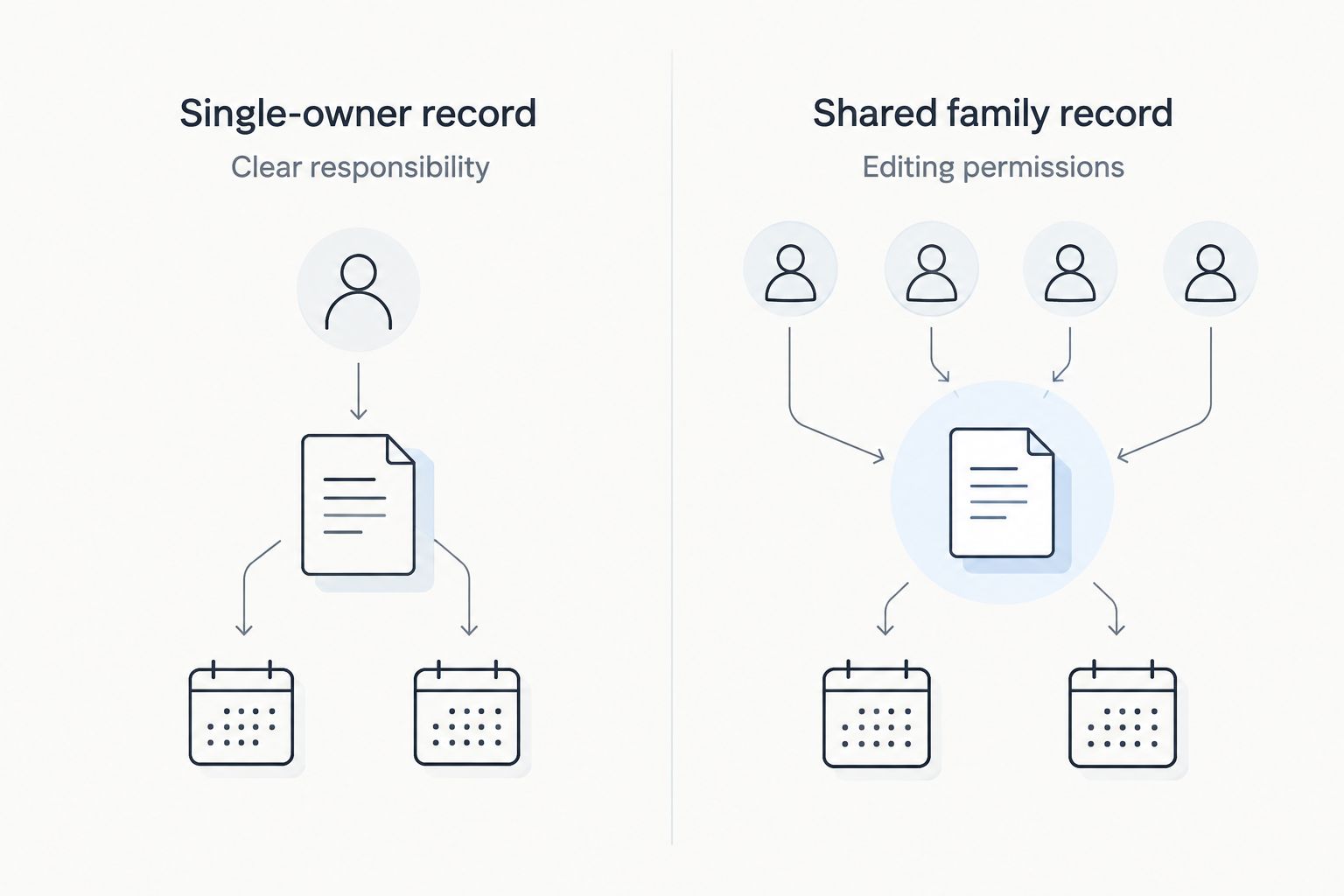
Keep the shared record limited to information contributors need. Store payment credentials elsewhere, and avoid placing full account details in a document distributed to relatives or event vendors.
Payment ledger
Record the deposit and each later payment
- Follow the verified Payment instructions supplied for your booking. If new instructions arrive unexpectedly, confirm them through your established venue contact before sending money.
- After paying, enter Payment sent date, Amount sent, Transaction reference, and Receipt. Keep evidence of the transaction even if an acknowledgment has not arrived.
- Use distinct status labels: Not sent, Sent, and Confirmed. Mark a payment Confirmed only when you have evidence that the venue has credited it to the booking.
- Update Remaining balance from the agreed total and confirmed payments. Keep unconfirmed transfers visible separately so another family member does not mistake them for unpaid obligations and send a duplicate.
- Compare your record with the venue's statement after each payment. Ask about discrepancies while the transaction details are easy to retrieve.
Expected result: every payment connects to a due date, transaction record, and venue acknowledgment. You can distinguish money sent from money credited without searching through separate family message threads.
Do not mark a payment complete merely because a relative reimbursed you. A family contribution and a venue payment are different transactions; record them separately if both need tracking.
For a 2026 quinceañera, save receipts with the event date and payment milestone in the filename. Use the same naming pattern throughout the folder so the final reconciliation does not depend on remembering who sent which screenshot.
Final balance review
Reconcile the booking before the last payment
- Request the current booking statement before the final deadline. Compare it with the signed agreement and every approved amendment, not just the original proposal.
- Check Confirmed payments, Approved changes, Current total, Remaining balance, and Final due date. Ask for an explanation of any entry you cannot connect to an agreed term.
- Verify the final event details with the venue contact. Review guest-count obligations, event hours, and any services covered by the agreement. Confirm how unresolved changes affect the balance before paying against an outdated statement.
- Send the final payment through the verified method. Save the receipt, request acknowledgment, and record the balance the venue confirms afterward.
- Archive the signed agreement, amendments, receipts, and final statement together. Keep operational instructions accessible separately so event-day helpers do not need access to financial documents.
Expected result: your records and the venue's records agree on the payments credited and any remaining obligation. A completed payment does not, by itself, confirm that every requested event change was accepted.
Before the celebration, distinguish payment completion from event readiness. The final financial record should be settled alongside the operational details, not used as a substitute for confirming them.
When the guest count or event date changes
Run a change workflow whenever an approved detail affects the booking. Editing your own calendar or spreadsheet does not amend the agreement.
- Record the request. Describe the proposed change and identify the agreement detail it affects.
- Obtain the venue's response. Ask whether the change is accepted and what happens to the payment schedule, deposit treatment, and remaining obligations.
- Save the amendment. Attach the written approval or revised agreement to the booking record. Preserve the earlier version rather than overwriting it.
- Update the calendar. Change payment dates only after the revised terms are accepted. Remove obsolete reminders so both schedules do not remain active.
Expected result: your event details, payment ledger, and calendar reflect the same accepted version. Keep pending requests visibly separate from approved changes.
For changes made during 2026, record the approval date as well as the revised event date. Those dates answer different questions: when the agreement changed and when the celebration takes place.
Troubleshooting
The deposit was sent, but the reservation is unclear
Contact the established booking representative with the transaction reference and signed agreement. Ask whether the reservation requirements are satisfied and request explicit written confirmation of the booking status.
A receipt and statement show different balances
Match the statement against individual transaction references rather than screenshots alone. Ask which payments have been credited and whether the statement includes an approved adjustment; preserve both records until the discrepancy is resolved.
A deadline is approaching, but a payment is pending
Notify the venue before the contractual deadline and provide the transaction evidence. Ask how the agreement treats a pending transfer; do not assume the date you initiated it satisfies the payment requirement.
Family contributions caused a duplicate payment
Reconcile contributions separately from payments sent to the venue. Contact the venue about the duplicate and request written instructions for its treatment rather than silently deducting it from a later obligation.
A requested change appears in messages but not the agreement
Ask the venue to confirm whether the request was accepted and to document any revised obligations. Keep tracking the existing terms until the amendment is agreed, rather than treating the request itself as approval.
Customize your workflow
Expand the booking record with separate tabs for family contributions, vendor contacts, and event decisions. Keep each tab's purpose clear: a contribution tracker explains who reimbursed whom, while the payment ledger explains what the venue received.
When relatives need to review event decisions in different languages, prepare a plain-language summary they can understand. Retain the signed agreement beside that summary; an informal translation should not quietly introduce different deadlines or obligations.
For broader celebration planning beyond the payment record, use the guide to event spaces for Latino community celebrations.
Discuss your quinceañera booking
Ask which booking terms and payment requirements apply to your proposed celebration.
FAQ
How do I arrange a quinceañera venue payment plan on Long Island?
Ask the venue for a written schedule tied to your booking agreement. Confirm each deadline, the deposit treatment, accepted payment methods, and the action that confirms your reservation before paying.
Does Longislandprivateevents offer monthly quinceañera payments?
Request booking-specific payment terms directly from Longislandprivateevents. Use only the schedule confirmed in your written agreement; this workflow does not establish a monthly installment offer.
Does sending a deposit automatically reserve my quinceañera date?
Treat the date as confirmed only when the venue confirms that its reservation requirements are satisfied. Keep that confirmation with your signed agreement and deposit receipt.
Can several family members contribute toward the venue payments?
Track family contributions separately from payments to the venue. Ask the venue how payments from different contributors should be identified, and assign one person to reconcile the booking ledger.
What happens to my deposit if I change the event date?
Your agreement and any accepted amendment determine how the deposit is treated. Obtain written confirmation of the revised date, payment schedule, and deposit treatment before updating your records.
When should I pay the final quinceañera venue balance?
Pay according to the final deadline in your accepted agreement. Reconcile the current statement, credited payments, and approved changes before sending the remaining balance.
What should I keep after making the final payment in 2026?
Keep the signed agreement, accepted amendments, transaction receipts, and venue acknowledgment together. Save the final statement showing the balance the venue confirms.
One last thing
Ask for confirmation of both the payment and the booking status. A receipt answers whether a transaction occurred; reservation confirmation answers whether the venue's booking requirements are satisfied. Keep both in your 2026 event folder.